- Published on
Understand all the Security Groups of EKS
- Authors

- Name
- Hoang Nguyen
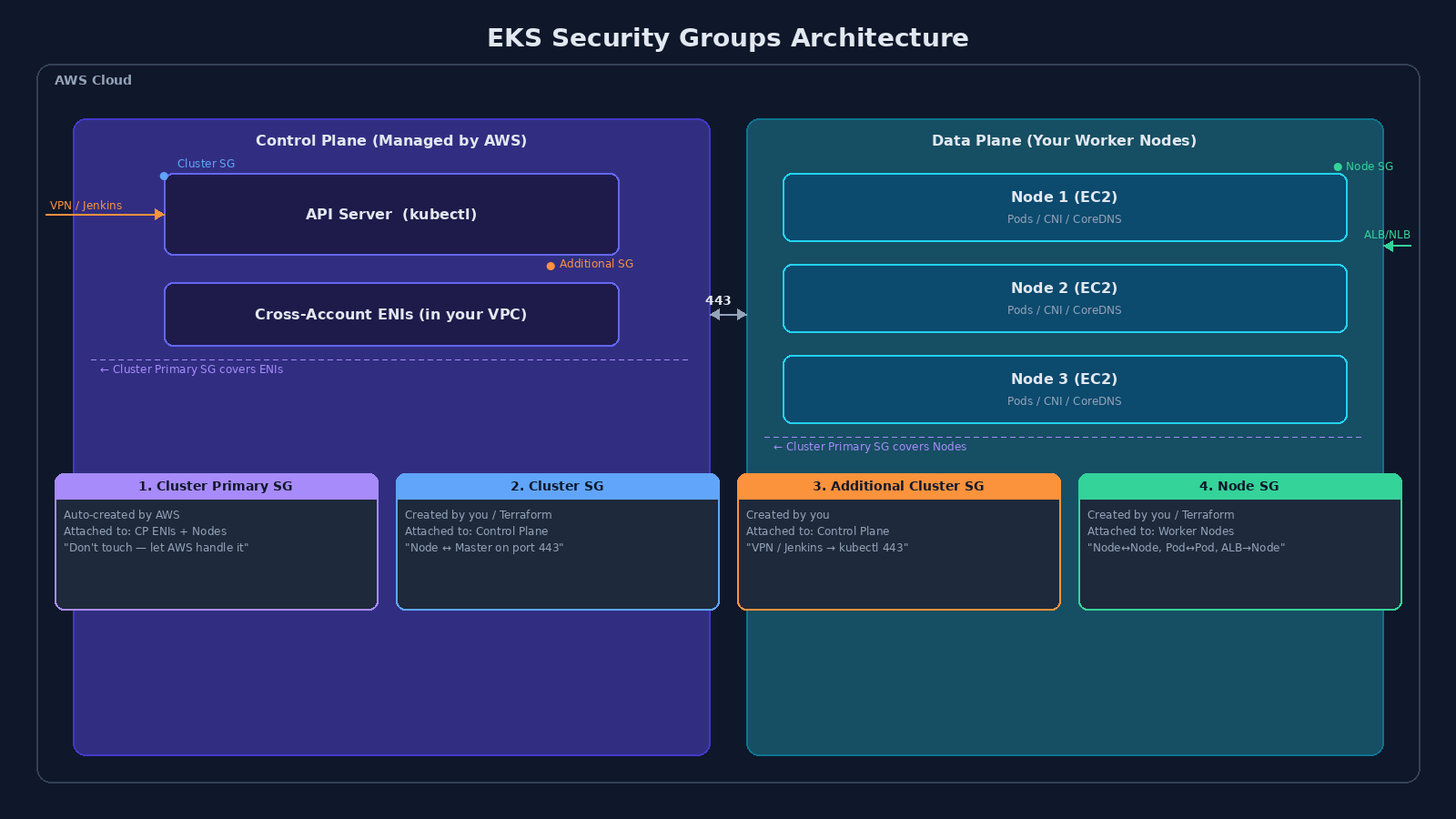
You've just stumbled upon one of the most confusing "matrixes" of AWS EKS, especially when configuring it with Terraform. Anyone new to EKS has probably wondered: "Why do I need four Security Groups just for Nodes to communicate with the Cluster?"
Let me explain in detail, breaking down each layer in the clearest way possible, from a standard SRE operational perspective.
What: Two Planes, Four Guards
In the EKS world, the architecture is divided into two parts:
- Control Plane — the hidden Master Cluster managed by AWS (API Server, etcd, scheduler).
- Data Plane — your Worker Nodes (EC2 instances running Pods).
These four SGs exist to protect those two parts. Each one has a different origin, a different attachment point, and a different job.
Why: Each SG Has a Purpose
1. Cluster Primary SG — "The Station Command"
| Terraform ID | cluster_primary_security_group_id |
| Created by | AWS (automatically, when you create the cluster) |
| Attached to | Control Plane ENIs + Managed Node Groups |
| Can you delete it? | No |
AWS created this with a single rule: allow everything sharing this SG to communicate freely with each other. That's it.
Think of it as the default radio channel between the Master and the Nodes. Both sides are assigned this SG automatically, so they can talk without you writing a single rule.
When to use it? Almost never. Don't modify it. Let AWS manage it so the Control Plane and Managed Nodes never lose connectivity.
2. Cluster SG — "The Control Plane Security Gateway"
| Terraform ID | cluster_security_group_id |
| Created by | You (or the Terraform module) |
| Attached to | Control Plane (via the EKS API) |
This one directly protects the API Server — where your kubectl commands land. Unlike the Primary SG generated by AWS, this one is yours to customize.
Example rules:
- Allow SG Node → port
443(so Nodes can send logs and status to the Control Plane). - Allow SG Node → port
10250(so the Control Plane can callkubeleton the Nodes).
3. Additional Cluster SG — "The Outside Gateway"
| Terraform ID | cluster_additional_security_group_ids |
| Created by | You, then pass the ID to EKS |
| Attached to | Control Plane |
This opens a path for external systems (outside the EKS cluster) to call kubectl.
When to use it?
- You want to restrict only your company's VPN to call
kubectl. Create an SG containing the VPN IP → place it here. - You use Jenkins/GitLab CI in a different VPC that needs to deploy to EKS. Create an SG containing the Jenkins IP → place it here.
4. Node SG — "The Data Plane Fortress"
| Terraform ID | node_security_group_id |
| Created by | You (or Terraform) |
| Attached to | All EC2 Worker Nodes (Node Group) |
This manages all traffic going to/from your Pods. The required rules:
- Node ↔ Node — all ports open between Nodes (for CNIs like Calico/Cilium to function, and CoreDNS to resolve domain names).
- Control Plane → Node — open from SG Cluster (for the Control Plane to call down to retrieve logs or execute
kubectl exec). - ALB/NLB → Node — open from the Load Balancer so Internet traffic can reach the Pods.
How: The Summary Table
| SG Type | Attached to | Who manages it? | Practical purpose |
|---|---|---|---|
| Cluster Primary | Control Plane + Nodes | AWS | Let AWS handle it — don't interfere |
| Cluster | Control Plane | You / Terraform | Basic Node ↔ Master communication |
| Additional Cluster | Control Plane | You | Open port 443 for VPN, Jenkins, GitLab CI |
| Node | Worker Nodes (EC2) | You / Terraform | Node↔Node, Pod↔Pod, ALB→Node |
The mental model is simple: Primary SG is the default highway AWS built for you. Cluster SG and Additional SG are the gates you build on the Control Plane side. Node SG is the gate you build on the Data Plane side.
If you remember nothing else: the Primary SG is AWS's — hands off. The other three are yours to configure based on what needs to talk to what.
P/S: If you're setting this up with Terraform for the first time, the terraform-aws-eks module handles most of this automatically. But knowing which SG does what will save you hours of debugging when something can't connect — and it will.